
Scrapling 交互式 Shell 指南
Section titled “Scrapling 交互式 Shell 指南”面向开发者与数据科学家的强大 Web Scraping REPL
Scrapling 交互式 Shell 是一个基于 IPython 增强而来的环境,专门为 Web Scraping 任务设计。它让你无需手动导入即可直接访问 Scrapling 的全部能力,还提供智能快捷方式、自动页面管理,以及诸如 curl 命令转换等高级工具。
为什么要使用交互式 Shell?
Section titled “为什么要使用交互式 Shell?”交互式 Shell 能把传统“写脚本 → 运行 → 修改 → 再运行”的缓慢循环,变成快速、探索式的抓取体验。它尤其适合:
- 快速原型验证:即时测试抓取策略。
- 数据探索:交互式浏览网站并提取信息。
- 学习 Scrapling:实时试验各项功能。
- 调试爬虫:逐步执行请求并检查结果。
- 转换工作流:把浏览器 DevTools 中的 curl 命令一行转换成 Fetcher 请求。
启动 Shell
Section titled “启动 Shell”# 启动交互式 Shellscrapling shell
# 执行代码后退出(适合脚本化场景)scrapling shell -c "get('https://quotes.toscrape.com'); print(len(page.css('.quote')))"
# 设置日志级别scrapling shell --loglevel info启动后,你会看到 Scrapling 的欢迎界面,并可以像下面这样立即开始抓取:
# 无需 import,一切都已就绪!get('https://news.ycombinator.com')
# 探查页面结构page.css('a')[:5]  # 查看前 5 个链接
# 细化选择器stories = page.css('.titleline>a')len(stories)  # 30
# 提取指定数据for story in stories[:3]:...     title = story.text...     url = story['href']...     print(f"{title}: {url}")
# 尝试不同提取方式titles = page.css('.titleline>a::text')  # 直接提取文本urls = page.css('.titleline>a::attr(href)')  # 直接提取属性
内置快捷函数
Section titled “内置快捷函数”Shell 提供了许多便捷快捷方式,可省去模板代码:
get(url, **kwargs):发送 HTTP GET 请求(代替Fetcher.get)post(url, **kwargs):发送 HTTP POST 请求(代替Fetcher.post)put(url, **kwargs):发送 HTTP PUT 请求(代替Fetcher.put)delete(url, **kwargs):发送 HTTP DELETE 请求(代替Fetcher.delete)fetch(url, **kwargs):基于浏览器抓取(代替DynamicFetcher.fetch)stealthy_fetch(url, **kwargs):隐身浏览器抓取(代替StealthyFetcher.fetch)
此外,最常用的类也会自动注入环境,无需手动导入,例如 Fetcher、AsyncFetcher、DynamicFetcher、StealthyFetcher 和 Selector。
智能页面管理
Section titled “智能页面管理”Shell 会自动跟踪你的请求与页面:
-
访问当前页面
page和response会自动指向最近一次抓取到的页面:get('https://quotes.toscrape.com')# 'page' 和 'response' 都指向最近抓取的页面page.url # 'https://quotes.toscrape.com'response.status # 输出 200;与 page.status 相同 -
页面历史
pages会记录最近五个页面(它本身是一个Selectors对象):get('https://site1.com')get('https://site2.com')get('https://site3.com')# 访问最近 5 个页面len(pages) # 带 page 历史的 `Selectors` 对象 -> 3pages[0].url # 历史中的第一页 -> 'https://site1.com'pages[-1].url # 最近的页面 -> 'https://site3.com'# 使用历史页面for i, old_page in enumerate(pages):... print(f"Page {i}: {old_page.url} - {old_page.status}")
其他实用命令
Section titled “其他实用命令”在浏览器中查看已抓取页面:
get('https://quotes.toscrape.com')view(page) # 在默认浏览器中打开该页面 HTMLCurl 命令集成
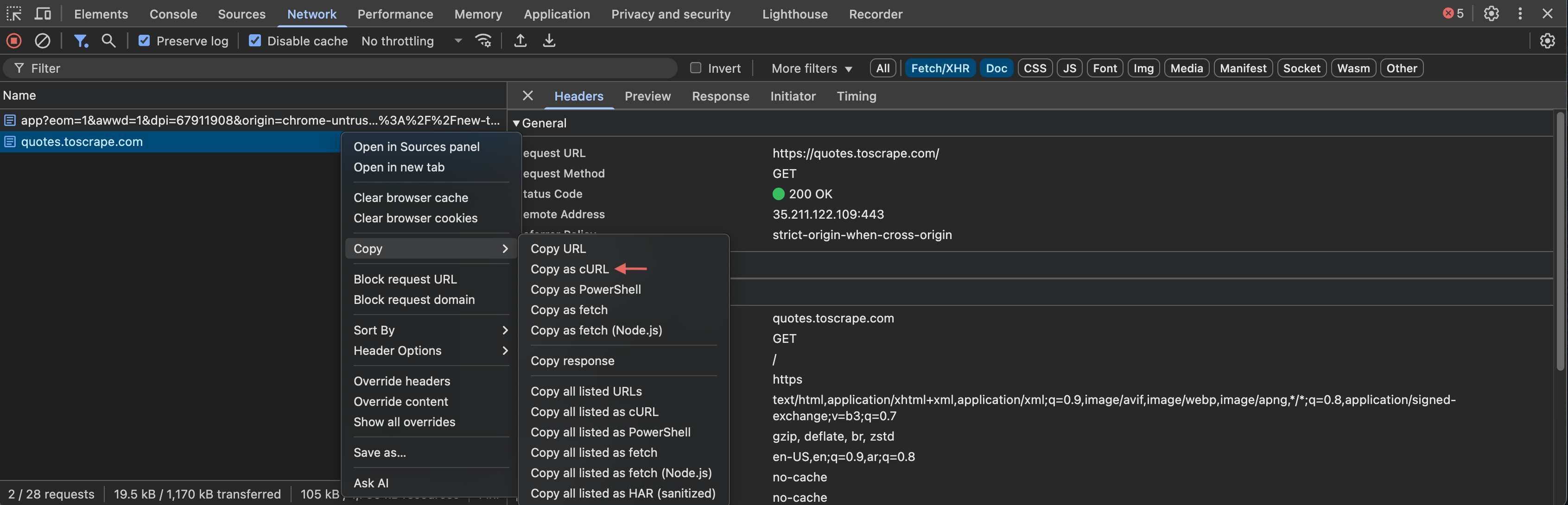
Section titled “Curl 命令集成”Shell 提供了两个函数,帮助你把浏览器 DevTools 中复制出的 curl 命令转换成 Fetcher 请求:uncurl 和 curl2fetcher。
首先,你需要像下面这样把某个请求复制为 curl 命令:
-
把 curl 命令转换成 Request 对象
curl_cmd = '''curl 'https://scrapling.requestcatcher.com/post' \... -X POST \... -H 'Content-Type: application/json' \... -d '{"name": "test", "value": 123}' '''request = uncurl(curl_cmd)request.method # -> 'post'request.url # -> 'https://scrapling.requestcatcher.com/post'request.headers # -> {'Content-Type': 'application/json'} -
直接执行 curl 命令
# 一步转换并执行curl2fetcher(curl_cmd)page.status # -> 200page.json()['json'] # -> {'name': 'test', 'value': 123}
IPython 特性
Section titled “IPython 特性”Shell 继承了全部 IPython 能力:
# Magic 命令%time page = get('https://example.com')  # 统计执行时间%history  # 查看命令历史%save filename.py 1-10  # 将第 1 到 10 条命令保存到文件
# Tab 补全在各处都可用page.c<TAB>  # 会显示:css、cookies、headers 等Fetcher.<TAB>  # 显示 Fetcher 的全部方法
# 对象检查get? # 查看 get 的文档下面是一些由 AI 生成的示例:
电商数据采集
Section titled “电商数据采集”# 从商品列表页开始catalog = get('https://shop.example.com/products')
# 找到商品链接product_links = catalog.css('.product-link::attr(href)')print(f"Found {len(product_links)} products")
# 先抽样几个商品看看for link in product_links[:3]:... product = get(f"https://shop.example.com{link}")... name = product.css('.product-name::text').get('')... price = product.css('.price::text').get('')... print(f"{name}: {price}")
# 用 session 提升批量抓取效率from scrapling.fetchers import FetcherSessionwith FetcherSession() as session:... products = []... for link in product_links:... product = session.get(f"https://shop.example.com{link}")... products.append({... 'name': product.css('.product-name::text').get(''),... 'price': product.css('.price::text').get(''),... 'url': link... })API 集成与测试
Section titled “API 集成与测试”>>> # 交互式测试 API 端点>>> response = get('https://jsonplaceholder.typicode.com/posts/1')>>> response.json(){'userId': 1, 'id': 1, 'title': 'sunt aut...', 'body': 'quia et...'}
>>> # 测试 POST 请求>>> new_post = post('https://jsonplaceholder.typicode.com/posts',... json={'title': 'Test Post', 'body': 'Test content', 'userId': 1})>>> new_post.json()['id']101
>>> # 用不同数据继续测试>>> updated = put(f'https://jsonplaceholder.typicode.com/posts/{new_post.json()["id"]}',... json={'title': 'Updated Title'})如果终端内置帮助还不够,你还可以查看:
就是这样,祝你抓取顺利!有了这个 Shell,Web Scraping 会像对话一样自然。